Games Guide
1CEO Hot Games Lobby: How to Explore Tiles, Rules and Pacing
A practical walkthrough of the 1ceo hot games lobby — how tiles are organized, how to test new games sensibly, and how to pace your sessions on 1 ceo.
This guide targets 1ceo hot games and related searches such as 1 ceo, 1ceo games, 1 ceo game, 1ceo hot games, 1ceo lobby. It is written for users who want clear 1CEO information before downloading.
What the Hot Games section actually shows you
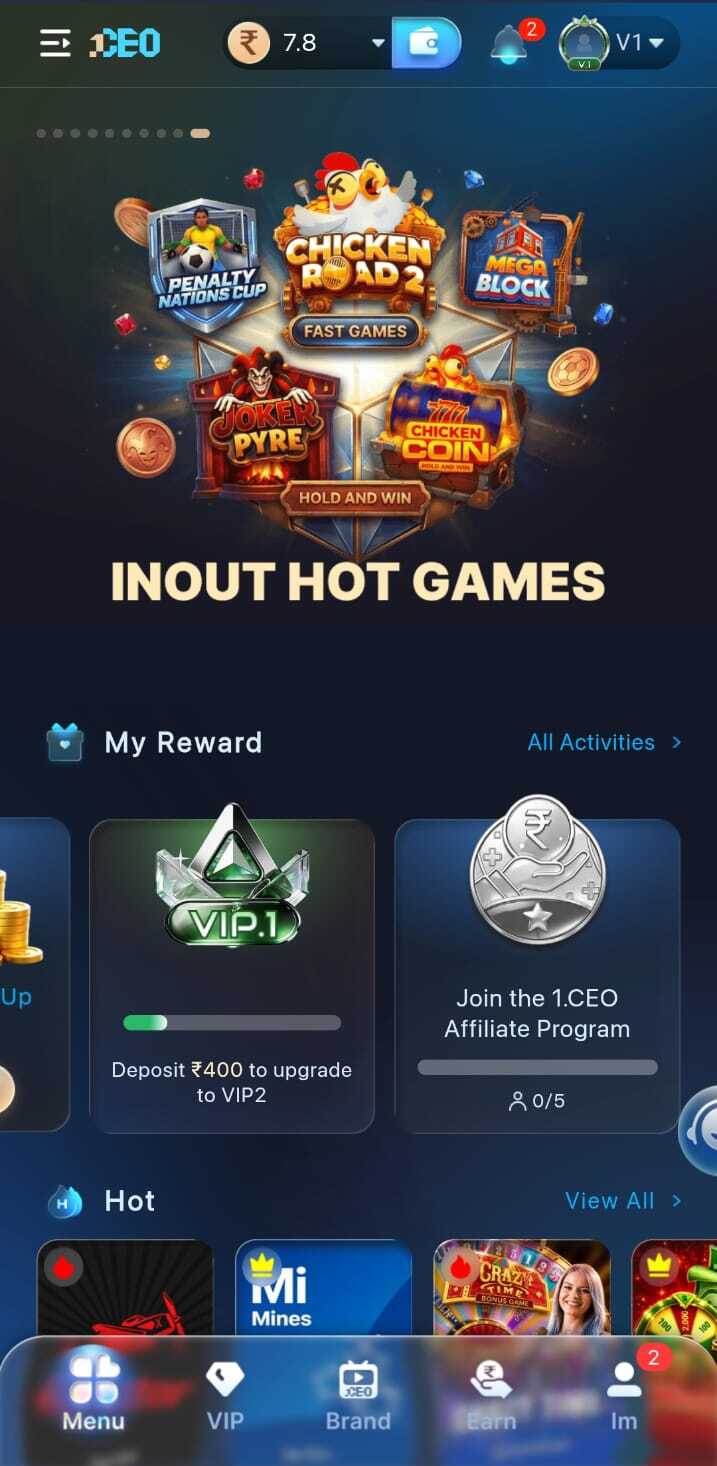
When you open 1ceo and clear the splash screen, the first area designed to catch your eye is the Hot Games row. It sits near the top of the lobby and highlights the titles getting the most attention at that moment. For someone searching "1ceo" or "1 ceo" to see what is actually inside the app, this section is the quickest visual summary of the catalogue.
Hot Games is not a separate download or a hidden VIP room. It is simply the front shelf of the 1ceo game lobby, built to help you spot popular tiles without scrolling through every category. Knowing that upfront keeps you from assuming a tile is "better" or "easier" just because it sits in the top row.
How the lobby groups different game styles
Beneath the featured row, the 1 ceo lobby separates games into clean visual tiles with short labels and artwork. Depending on the app build, you will see fast-paced arcade rounds, card-style rooms, and slot-style titles side by side. Each category moves at a different speed and asks for a different level of attention.
Before tapping straight into the brightest thumbnail, take thirty seconds to scroll down the main lobby. Seeing the full spread makes it much easier to pick something that matches the kind of session you want, rather than letting the top banner decide for you.
Testing a game tile without rushing in
A useful habit for anyone new to 1ceo is to open two or three different tiles just to observe how they load, how the buttons are placed, and how fast a round moves. You do not need to commit money or rush into an active round the second a screen finishes loading.
Pay attention to how clearly the rules and payout or scoring tables are shown inside each tile. A well-organized game makes its basics obvious within a few seconds. If a tile feels confusing, too fast, or cluttered on your phone screen, exit back to the lobby and try another one.
Reading in-game rules before your first round
Almost every tile in the 1 ceo lobby includes a small info or rules icon in the corner. Most users ignore it and learn by trial and error, which is the slowest and most expensive way to figure out how a game works. Spending one minute reading the rules tab tells you what counts as a round, what the minimum entry is, and how results are settled.
This habit matters even more if you switch between different categories in the same session. Two games that look similar from their lobby icons can follow completely different round timers and rules. Checking the info screen first removes guesswork.
Matching game pace to your session plan
Fast games can burn through both your time and your budget much quicker than slower card or table formats. If you only have ten minutes, a short-round tile might fit well as long as you set a strict stop point. If you want a calmer session, slower formats give you breathing room between decisions.
Set your session budget and timer before opening the 1ceo lobby, not after a few rounds have already passed. When either limit is reached, return to the home screen and close the app cleanly.
How lobby layout connects to rewards and VIP
While browsing Hot Games, you will notice badges, daily reward cards, and VIP indicators sitting along the top and bottom bars. Those elements track general activity across the platform rather than tying you to one specific tile. You do not need to force yourself onto a game you dislike just because a banner sits near it.
Keep your focus on games you genuinely find straightforward and enjoyable to play, and let any reward progress sit quietly in the background.
Quick troubleshooting if a game tile won't load
Because individual tiles inside 1ceo pull assets over the network, a tile that hangs on a loading spinner usually points to a weak connection rather than a broken account. Switch between Wi-Fi and mobile data, or close background apps to free up memory before reopening the tile.
If the whole lobby feels sluggish across multiple days, check the 1ceo update guide and confirm you are running the latest official build from the download page.
1CEO Hot Games Lobby Overview FAQ
What is in the 1ceo Hot Games section?
Hot Games highlights the most popular and frequently opened game tiles inside the 1ceo lobby so new users can find active titles quickly.
Do I need a separate app for 1 ceo hot games?
No. All game tiles load inside the same 1ceo app once you download and log into your account.
Are Hot Games guaranteed to pay out more?
No. Placement in Hot Games reflects popularity and visibility, not guaranteed results. Always read the rules inside each tile and stick to your budget.
What should I do if a game tile inside 1ceo freezes?
Check your internet connection, close heavy background apps, and reopen the tile. If it keeps happening, check for an app update on the official page.